
Red Background Profile Picture (DP) Prompt for ChatGPT & Google Gemini
Do you still set your profile picture the old-school way on social media accounts like WhatsApp, Facebook, and Instagram? Wait! In this era of AI, you can now create profile pictures with luxurious AI backgrounds. Yes! Red background profile pictures are trending right now, and you can create one too.
Trending Luxury Red Background AI Portrait
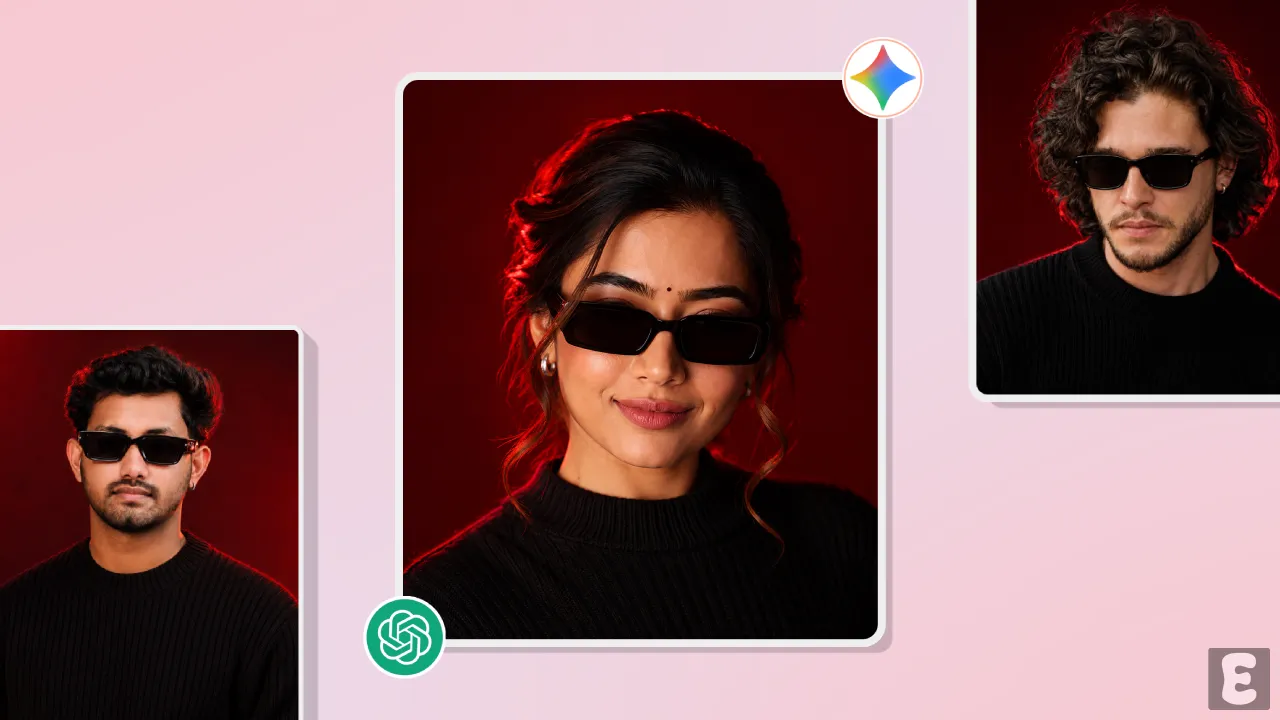
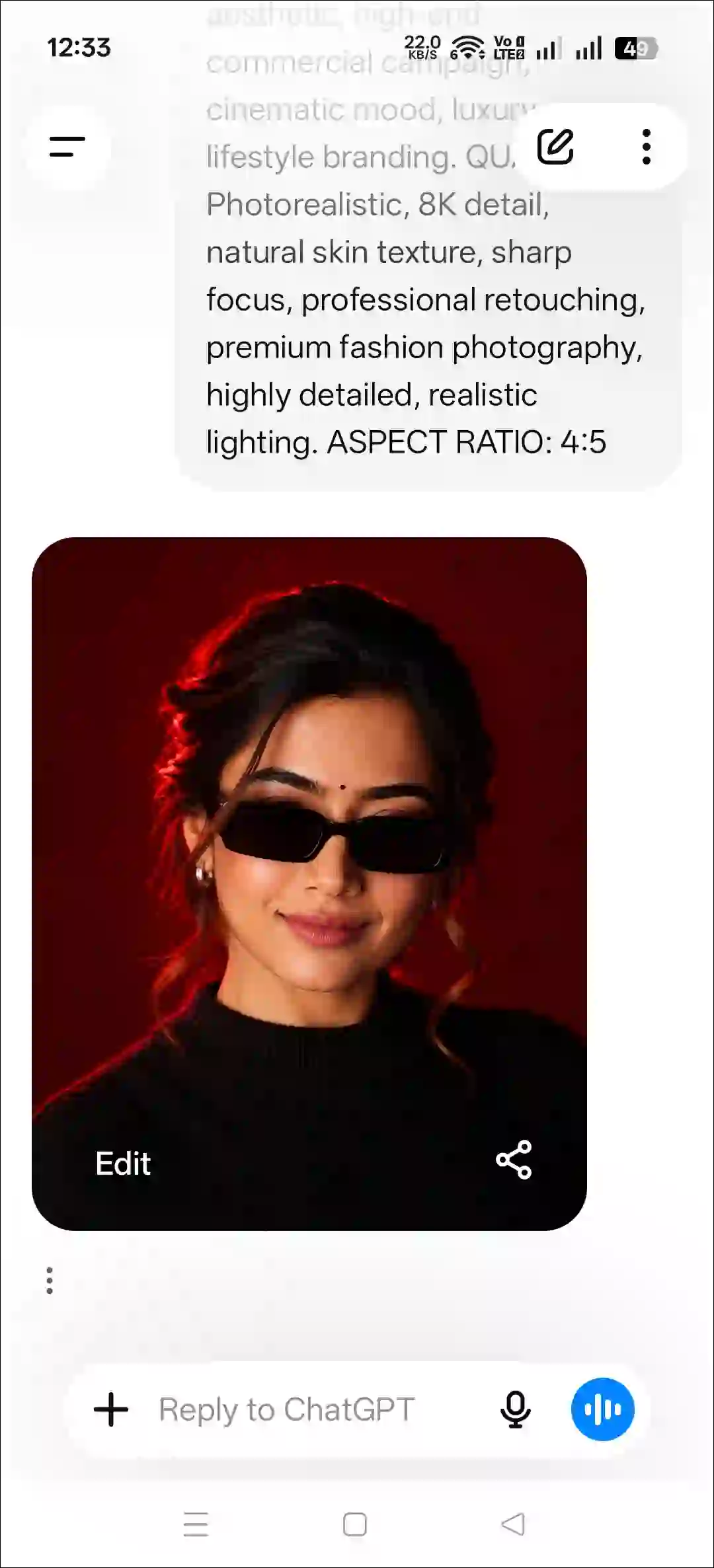
Most users keep their profile pictures simple, but this ‘Luxury Red Background AI Portrait’ gives your DP a professional look. This editing includes things like an elegant red background, realistic facial details, high-quality lighting, and professional portrait photography, which makes the image eye-catching.
Previously, creating such images required advanced editing software like Photoshop and Lightroom, and it used to take hours. But now, using a secret prompt and ChatGPT or Google Gemini, you can create images that fit perfectly as profile pictures.
What is Trending Red Background Profile Picture (DP) Prompt?
The red background AI profile picture prompt is a viral AI prompt designed specifically to transform an ordinary photo into a professional portrait with a red background. Both boys and girls can use this prompt to create a profile photo with an elegant red background.
How to Create Red Background Profile Picture (DP) using AI Prompt?
You can create such a profile picture using two methods, with the help of both ChatGPT and Google Gemini. You’ll also find the prompt below; just copy it with one click and paste it into ChatGPT or Gemini.
Method 1. Using ChatGPT + AI Prompt
Step 1. Open ChatGPT App or Website (Chatgpt.com).
Step 2. Tap on “+” Icon at the Bottom Bar.
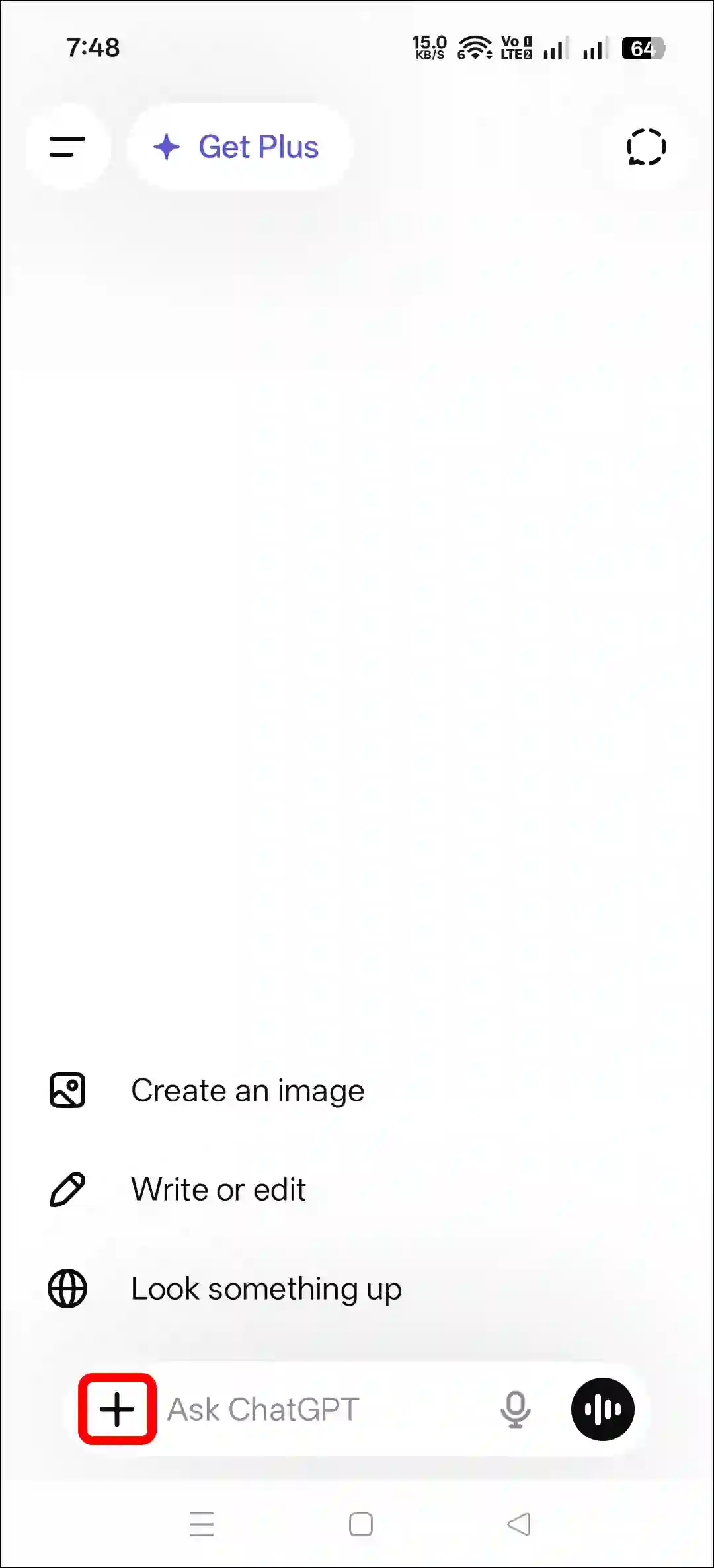
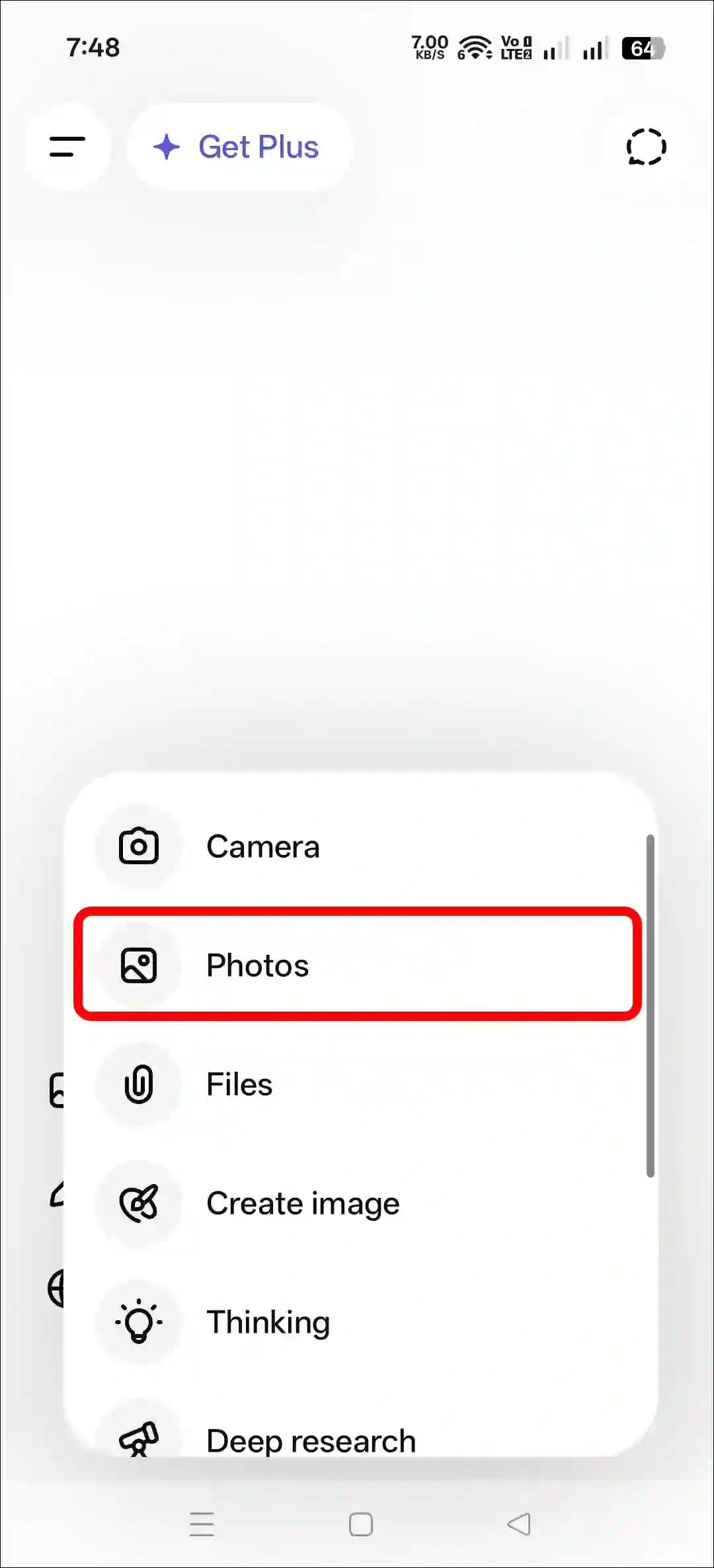
Step 3. Now, Tap on Photos and Upload a Photo as Reference.
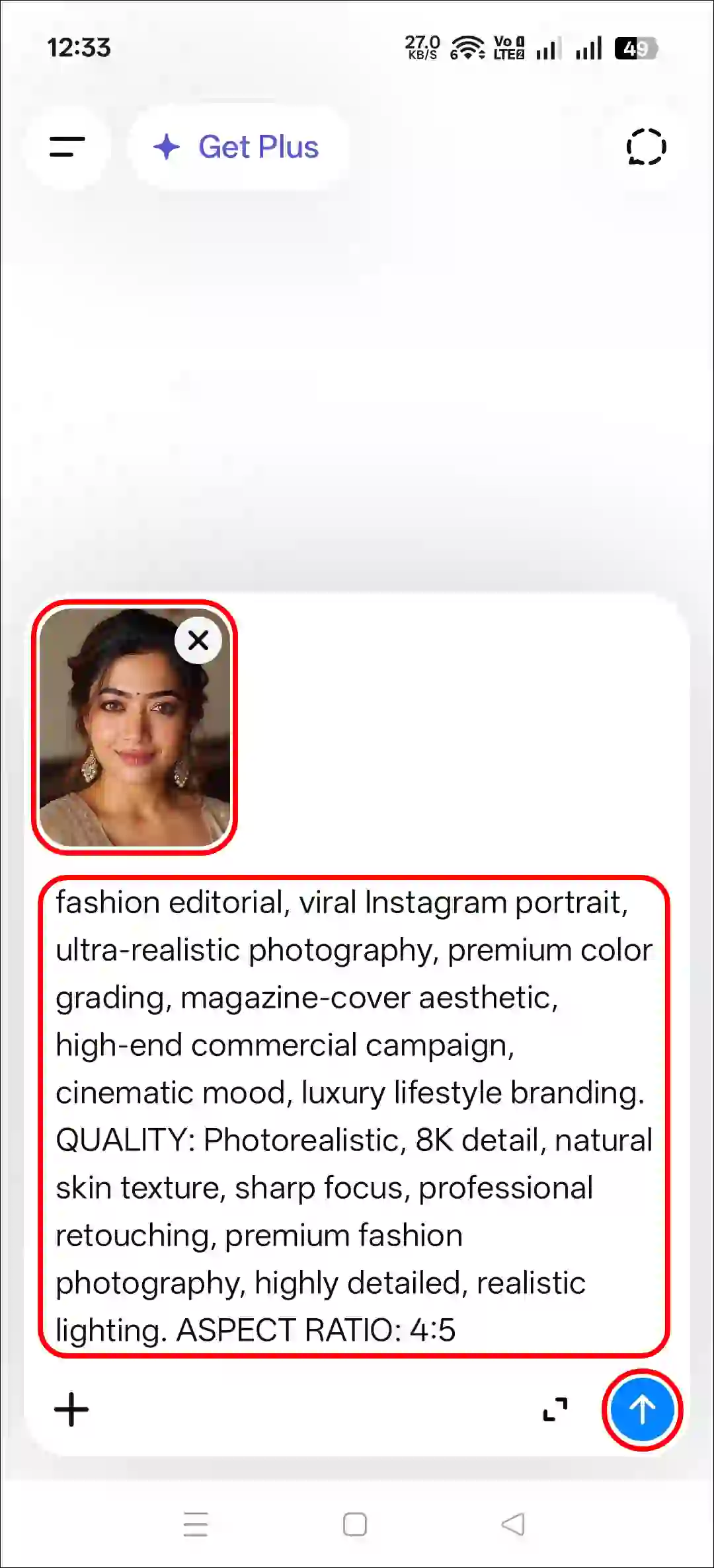
Step 4. Next, Copy and Paste the Prompt and Tap on Arrow Icon.
Step 5. Now, Your Photo is Ready to Use.
Method 2. Using Gemini + AI Prompt
Step 1. Open Gemini App or Website.
Step 2. Tap on “+” Icon and Select Images (Create and Edit) Option.
Step 3. Tap on “+” Icon and Select Photos Option and Upload a Picture.
Step 4. Now, Copy and Paste the Following Prompt in the Text Box Tap on Arrow.
Step 5. Wait for a While! Your Photo is Here.
That’s all! You’re done…
Also Try:
- Rain Photo Editing ChatGPT Prompt
- Instagram’s 3 Layer Photo ChatGPT Prompt
- Instagram’s Restyle AI Feature
Copy Trending Red Background DP Prompt
Use the uploaded reference image as the exact identity of the person. STRICT IDENTITY LOCK: Preserve 100% facial structure, skin tone, hairstyle, facial features, age, and identity. Do not alter the face, hair, skin texture, or any natural characteristics. Maintain complete likeness to the reference image. OUTFIT: Premium black ribbed knit sweater, sleek black rectangular sunglasses, small silver hoop earring, luxury men's fashion styling, clean and sophisticated look. POSE: Head slightly lowered, face turned subtly to the side, confident expression, subtle smile, looking slightly past the camera, relaxed yet powerful posture. SCENE: Luxury studio portrait, deep crimson-red gradient background, rich dark-red cinematic backdrop, minimal composition, premium editorial atmosphere. LIGHTING: Soft beauty lighting on the face, dramatic red rim light outlining the hair and shoulders, cinematic shadows, high contrast, luxury fashion-magazine lighting. CAMERA: Chest-up portrait, 85mm lens, shallow depth of field, ultra-sharp facial details, professional DSLR quality, subject in perfect focus. STYLE: Luxury men's fashion editorial, viral Instagram portrait, ultra-realistic photography, premium color grading, magazine-cover aesthetic, high-end commercial campaign, cinematic mood, luxury lifestyle branding. QUALITY: Photorealistic, 8K detail, natural skin texture, sharp focus, professional retouching, premium fashion photography, highly detailed, realistic lighting. ASPECT RATIO: 4:5FAQs
Q 1. Where can I find the prompt for a red background DP?
Answer – You can find a prompt for a red-background DP in this eBuzzPro’s post. Simply click on the prompt, and it will be copied to your device’s clipboard.
Q 2. How to make a profile picture with a red background?
Answer – You can create a DP for your social media profile in just a few seconds using a prompt and tools like ChatGPT or Gemini. Simply upload a reference image to ChatGPT, paste the prompt, and your image will be ready right away.

4:5